Technitium DNS Server runs on your own machine, so the token is only half of the connection. DNSense also needs to know where the server lives and be able to reach it.
Create a user for DNSense
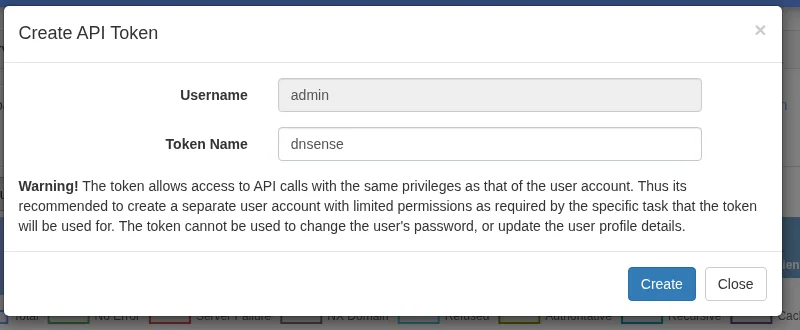
A token carries every right of the user it belongs to. Technitium warns about this itself when you create one. Rather than using admin, add a user under Administration > Users and give it modify rights on only the zones DNSense should manage. If the token ever leaks, it can do less damage, and you can delete that user without touching anything else.
Create the token
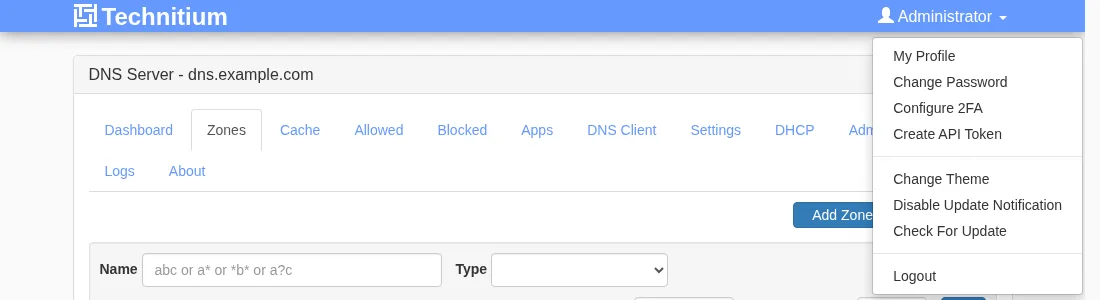
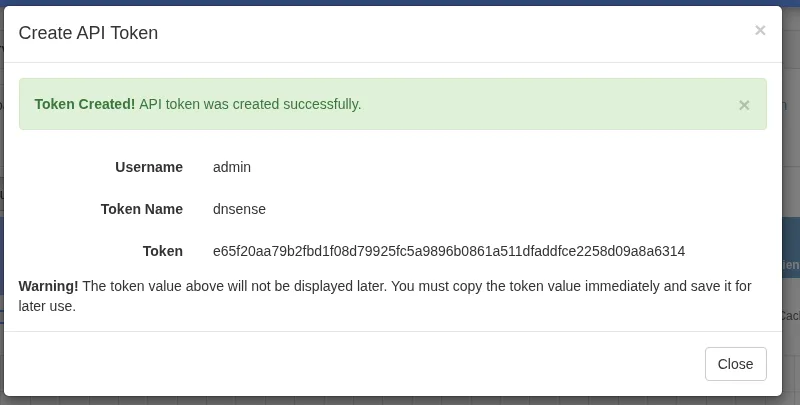
- Log in as that user, click the user name in the top right corner and choose Create API Token.
An administrator can also create a token for any user from Administration > Sessions with the Create Token button. The token does not expire. It cannot change the user's password or profile.
Check that DNSense can reach the server
The web console and the API share one port, 5380, over plain HTTP. An API token sent over HTTP can be read by anyone on the path, so put a TLS proxy such as nginx or Caddy in front of it and let that listen on 443. Make sure the firewall lets DNSense through.
Connect it to DNSense
Add a connection, choose Technitium DNS and fill in:
- Host. Write it as
https://dns.example.com when it sits behind a TLS proxy. Without a scheme, plain HTTP is assumed. - Port, optional. DNSense uses
5380 for HTTP and 443 for HTTPS when the field is empty, and a port you enter wins over one in the host. - API token, the value you just copied.
What to expect
- Primary zones only. Secondary, stub, forwarder and catalog zones are not listed. They are read-only or hold no records of yours.
- Supported types: A, AAAA, CNAME, MX, TXT, CAA and SRV. Technitium holds more types, and DNSense leaves those untouched.
- Disabled records are not shown in DNSense.
- Long TXT values. A TXT value longer than one 255-character string is refused rather than split.
If the connection fails, check the host and port first, then the firewall, then whether the user behind the token may see the zone.