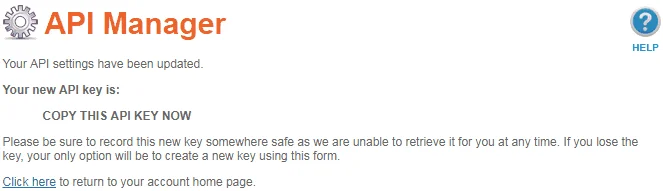
NameSilo uses one API key and nothing else. No secret, no per-domain switch. The two things worth knowing are that you cannot read the key back later, and that the IP restriction can lock DNSense out.
Generate the key
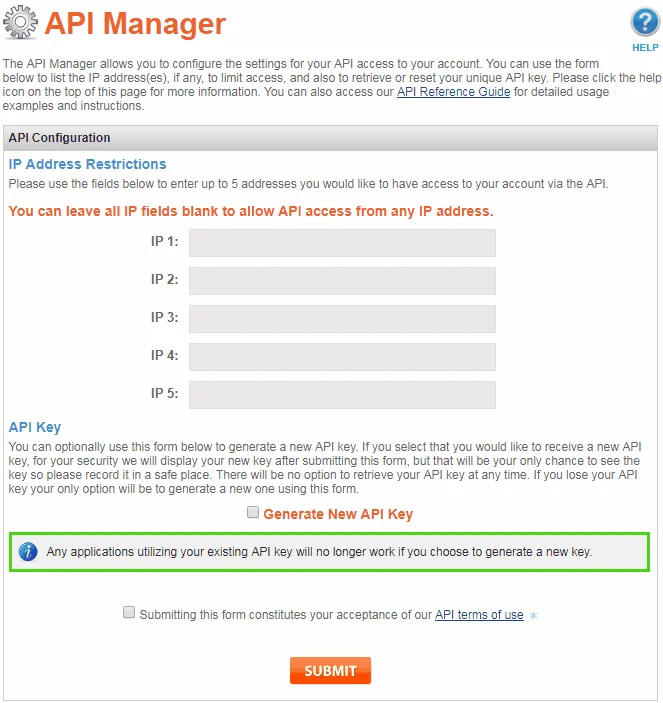
- Log in to NameSilo and open the API Manager from your account menu.
If the form offers a read-only option, leave it unchecked. DNSense has to write records, and with a read-only key the connection does not work.
Restrict by IP address, or not
The API Manager takes up to five IP addresses. Leave all fields blank and the key works from any address. Fill one in and NameSilo refuses calls from everywhere else, so DNSense can no longer connect. Restricting is safer, but only if you add the address DNSense calls from. If you are unsure, leave the fields empty and keep the key secret.
NameSilo logs every API action in the domain history, so you can see what was changed.
Connect it to DNSense
Add a connection, choose NameSilo and paste the key into the API key field. Every domain on the account shows up as a zone.
What to expect
- Supported types: A, AAAA, CNAME, MX and TXT. NameSilo's DNS endpoints take nothing else, so SRV, CAA and TLSA are not available here.
- TTL. Keep TTLs at one hour (3600 seconds) or more. NameSilo's documentation does not spell out the limits, so DNSense stays on the safe side.
- A gentle pace. NameSilo publishes no rate limit, so DNSense checks for drift on this connection less often than on most others. Changes you make in DNSense are pushed right away.
- Type changes. NameSilo cannot change a record's type in place, so DNSense deletes the record and adds the new one.
Besides DNS, DNSense reads expiry dates and lock status, changes nameservers and can register a domain from your NameSilo balance. A transfer code cannot be read over the API: DNSense requests it and NameSilo emails it to the administrative contact.
If the connection fails, check the IP restriction first, then check that you copied the whole key.