TransIP does not use a single token. You generate a key pair, keep the private half, and DNSense uses it to request short-lived access tokens on its own. The detail that trips people up is the IP whitelist.
Enable the API and add a key pair
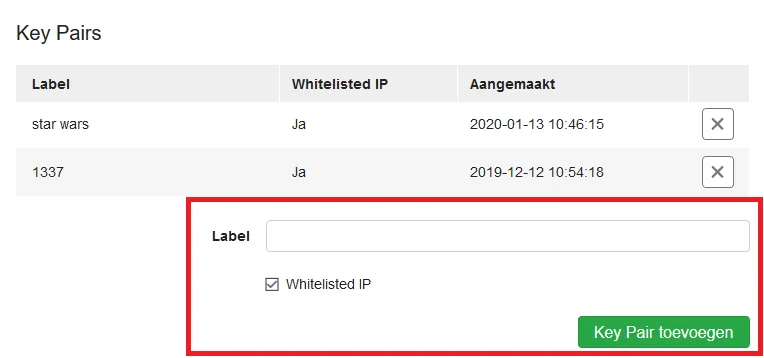
- Log in to the TransIP control panel, click your profile icon at the top right and go to My account > API. The direct address is
transip.nl/cp/account/api/.
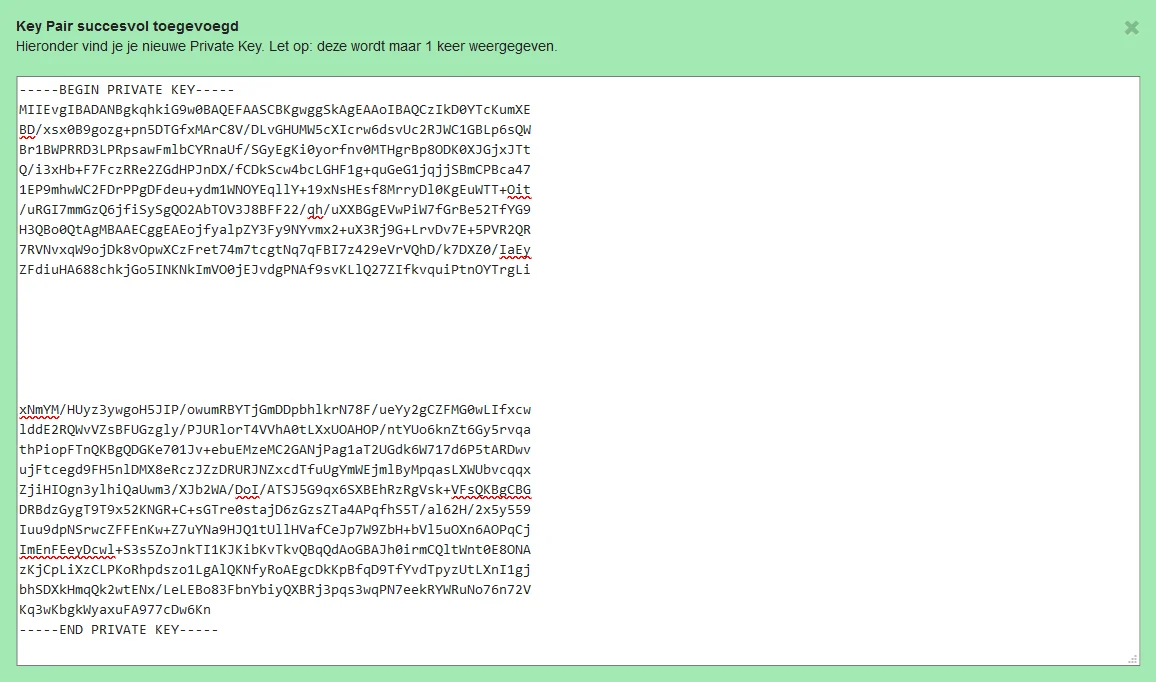
- Save. TransIP says "Key Pair successfully added" and shows the private key.
The screenshots come from TransIP's own documentation and show the Dutch interface.
Copy the private key now
The private key is shown once. Copy all of it, including the -----BEGIN PRIVATE KEY----- and -----END PRIVATE KEY----- lines. DNSense needs them to read the key.
If you lost it, delete the key pair and create another one. TransIP cannot show it a second time.
Connect it to DNSense
Add a connection, choose TransIP, enter your TransIP username (the one you log in with) and paste the private key. DNSense requests and refreshes the access tokens by itself, so there is nothing to renew by hand.
A note on safety
Without a whitelist, the private key is the only thing protecting API access to your account. Treat it like a password. If you suspect it leaked, delete the key pair in the same control panel page and nothing signed with it works any more.